Connect any machine
Collect data from major PLC brands, OPC, SQL databases and IoT devices. Your existing equipment stays in place.

AIWeb · Active Information Web Platform
AIWeb connects your machines, PLCs, databases and shop-floor devices. It turns their data into SCADA screens for line-side TVs, paperless forms for phones and tablets, automatic reports and instant alerts. Everything runs in a web browser, with nothing to install on users' devices.
Counted from the AIWeb licenses delivered to customers, from 2011 to June 2026.
PLC values, meters, databases and spreadsheets all live in different places. Someone has to walk over to check, or wait for the end-of-day summary.
By the time anyone notices a stopped machine, a temperature drift or rising scrap, hours of production are already lost.
Staff write down readings, re-key them and format the same reports every day. It is slow, and mistakes creep in.
AIWeb brings every source into one place. It shows the data live, alerts people right away and builds your reports automatically.
Each AIWeb page picks the mode that suits it. Both modes work side by side in one project, on the same data, with the same users and permissions.

SCADA Mode
For work that needs a fixed screen size: line-side TVs and control rooms
Design the screen for the display you actually use, placing figures, charts and machine graphics exactly where you want them. The screen shows exactly what you designed and scales to fill any display, however large. Typical uses:

Responsive Mode
For workflow and paperless work on phones, tablets and PCs
Pages rearrange themselves to fit any screen size. Use them wherever people fill in, check and approve things: machine checklists, material requests, stock in and out. Entries reach the database straight away and are easy to search later, with no paper files to lose.
Works on a tablet
The quality inspection screen is built for touch. Pick the part, pick the defect type, then tap where the defect is on the picture. Position, time and inspector are saved straight away, with no paper forms to type in later.

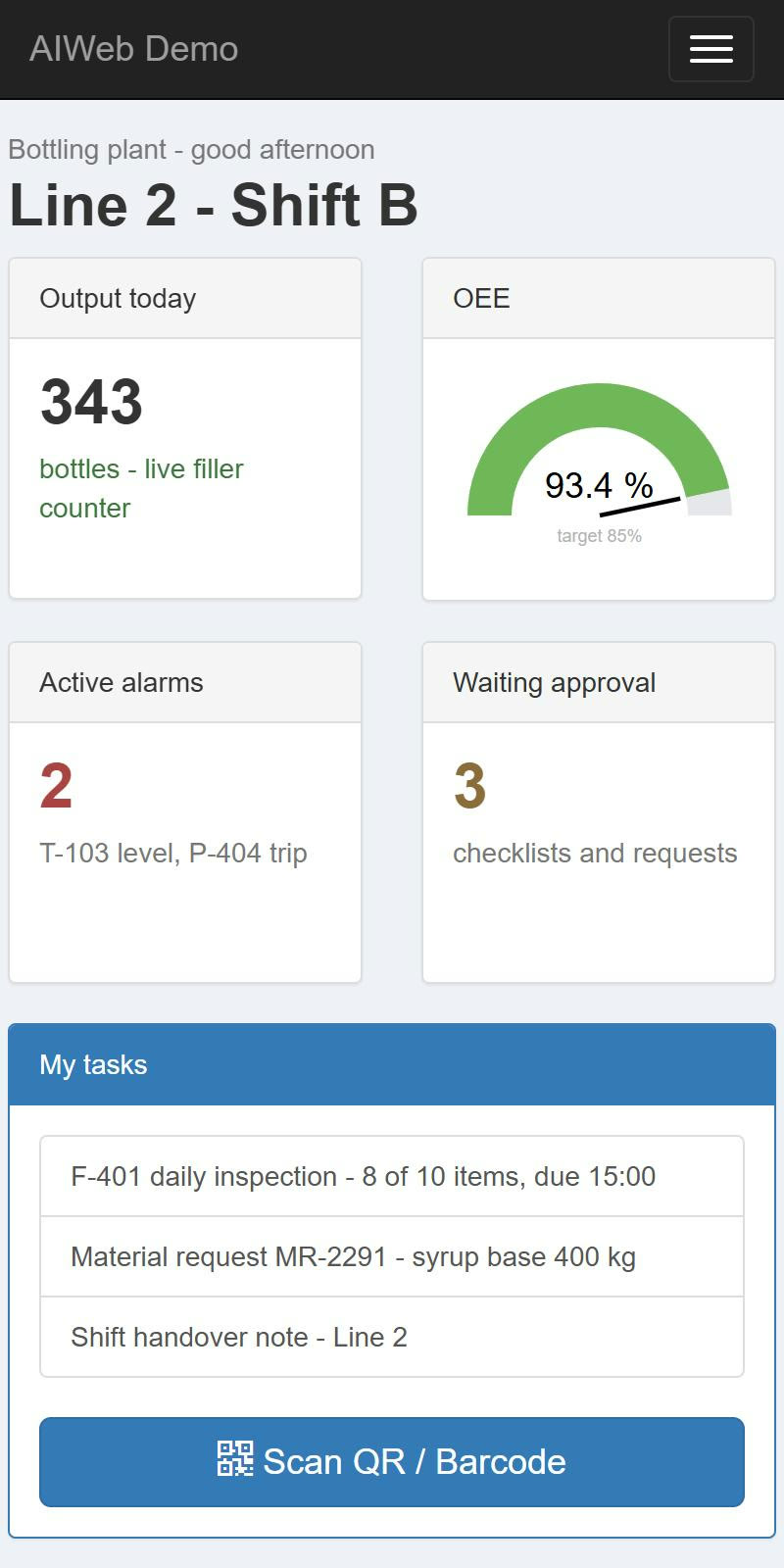
Output, OEE, alarms and pending approvals sit on one page. Open it in any phone browser and approve work from anywhere.
Screens shown are sample designs. Names and figures are fictitious.
Real screens built with AIWeb, running on live data on our demo server. Click a picture to see it full size, or book a live demo.

Status of 16 molding machines, OEE, open stops and downtime ranked by cause
TV 1920 x 1080
Pick the machine and the reason with big buttons in 3 steps, right at the machine
Tablet 1280 x 800
Plan versus actual, station status, Andon calls and hourly output
TV 1920 x 1080
Ingredient tanks, mixer, pasteurizer and filler, with OEE and energy
TV 1920 x 1080
Ten cold rooms, doors, defrost, the refrigeration plant and HACCP control points
TV 1920 x 1080
Process diagram, effluent against permit limits, aeration blowers and a 24-hour trend
TV 1920 x 1080
Solar output, inverters, battery, load by area and power quality
TV 1920 x 1080
Chiller efficiency, boiler, compressors and energy KPIs against target
TV 1920 x 1080Plant names, machines and figures are fictitious, for demonstration only.
Start with what you need today and add more as the plant grows.
Collect data from major PLC brands, OPC, SQL databases and IoT devices. Your existing equipment stays in place.
Drag and drop tanks, pumps, valves, pipes, gauges and charts in the browser, with no coding. Screens scale to fit line-side TVs.
Watch live values and long-term trends. Zoom into any time range, and get output tables by hour, shift or day.
Send alarms to LINE, Telegram or email, or announce them over a speaker. Every alarm is logged, along with who acknowledged it.
Turn Excel templates into PDF reports, Thai text included. Pull files from lab instruments, scales or your ERP into the database, with no re-keying.
Scan barcodes and QR codes, take photos, sign off and fill in inspection forms on a phone or handheld. Entries land in the system right away.
Print labels and slips straight from a web page, on label printers and receipt printers. Thai text is supported.
Show live IP camera video next to production data. Many people can watch at once without slowing the camera down.
Track robots from several brands on one map and send them tasks. Connect RFID, pick-to-light and electronic shelf labels.
Get SPC charts with automatic control limits. Log the weight, torque and measurement results for every part.
Set permissions per user and per page, and keep an audit log. Remote access runs securely over an encrypted channel.
The AIWeb Browser app runs full screen and rotates through pages automatically. It suits line-side displays and control rooms.
Two tools that remove the most paperwork from a factory: no re-keying, no hand-built reports.

Reporter
Build report templates in Excel, which everyone already knows
There is no new report designer to learn and no need to wait for a programmer. Anyone who uses Excel can build a template: lay out the page, add your logo, tables and charts as usual, then mark the cells that need data. AIWeb fills in the real figures every time the report runs.

Importer
Data from many sources, loaded automatically
Many instruments and programs can only export data as files. AIWeb watches their folders, and as soon as a new file arrives it reads it into the database. It can also pull data straight from Google Sheets. The data is then ready for screens, charts and reports. Example sources:
There is no need to replace machines or software. AIWeb becomes the hub that brings all your data together.
 AIWeb
We use AI to cut repetitive work and to set systems up faster.
Take a photo of a dial, meter or document, and AI reads the value and records it for you. Run the AI on-premise, so data never leaves your company, or in the cloud.
AI helps create data connections and design screens, so projects move several times faster. A person must approve every change before it goes live.
Type a question such as "Which line produced the least yesterday?" and get the answer straight from your database, without waiting for a report.
We survey the site, the machines and the information you want to see.
We link up your PLCs, databases and existing devices.
We build the agreed screens, reports and alerts.
We install, train your team and keep improving the system with you.
The team that builds and installs AIWeb in customer plants

A close partner company of SystemTALK
Founded in 2003A system integrator that has designed and installed factory automation for more than 20 years: PLC, SCADA, HMI and MES. They build AIWeb screens, reports and workflows for customers end to end, from design and installation to training and after-sales support.
Tell us what you want to see from your plant. We will suggest an approach and set up a demo for you.
Email us